# Complete Configuration & Deployment Guide
This document contains the complete configuration guide for the AI Stock Analysis System, intended for users who need advanced features or special deployment methods.
> Quick start guide available in [README_EN.md](README_EN.md). This document covers advanced configuration.
## Project Structure
```
daily_stock_analysis/
├── main.py # Main entry point
├── src/ # Core business logic
│ ├── analyzer.py # AI analyzer
│ ├── config.py # Configuration management
│ ├── notification.py # Message push notifications
│ └── ...
├── data_provider/ # Multi-source data adapters
├── bot/ # Bot interaction module
├── api/ # FastAPI backend service
├── apps/dsa-web/ # React frontend
├── docker/ # Docker configuration
├── docs/ # Project documentation
└── .github/workflows/ # GitHub Actions
```
## Table of Contents
- [Project Structure](#project-structure)
- [GitHub Actions Configuration](#github-actions-configuration)
- [Complete Environment Variables List](#complete-environment-variables-list)
- [Docker Deployment](#docker-deployment)
- [Local Deployment](#local-deployment)
- [Scheduled Task Configuration](#scheduled-task-configuration)
- [Notification Channel Configuration](#notification-channel-configuration)
- [Data Source Configuration](#data-source-configuration)
- [Advanced Features](#advanced-features)
- [Backtesting](#backtesting)
- [Local WebUI Management Interface](#local-webui-management-interface)
---
## GitHub Actions Configuration
### 1. Fork this Repository
Click the `Fork` button in the upper right corner.
### 2. Configure Secrets
Go to your forked repo → `Settings` → `Secrets and variables` → `Actions` → `New repository secret`
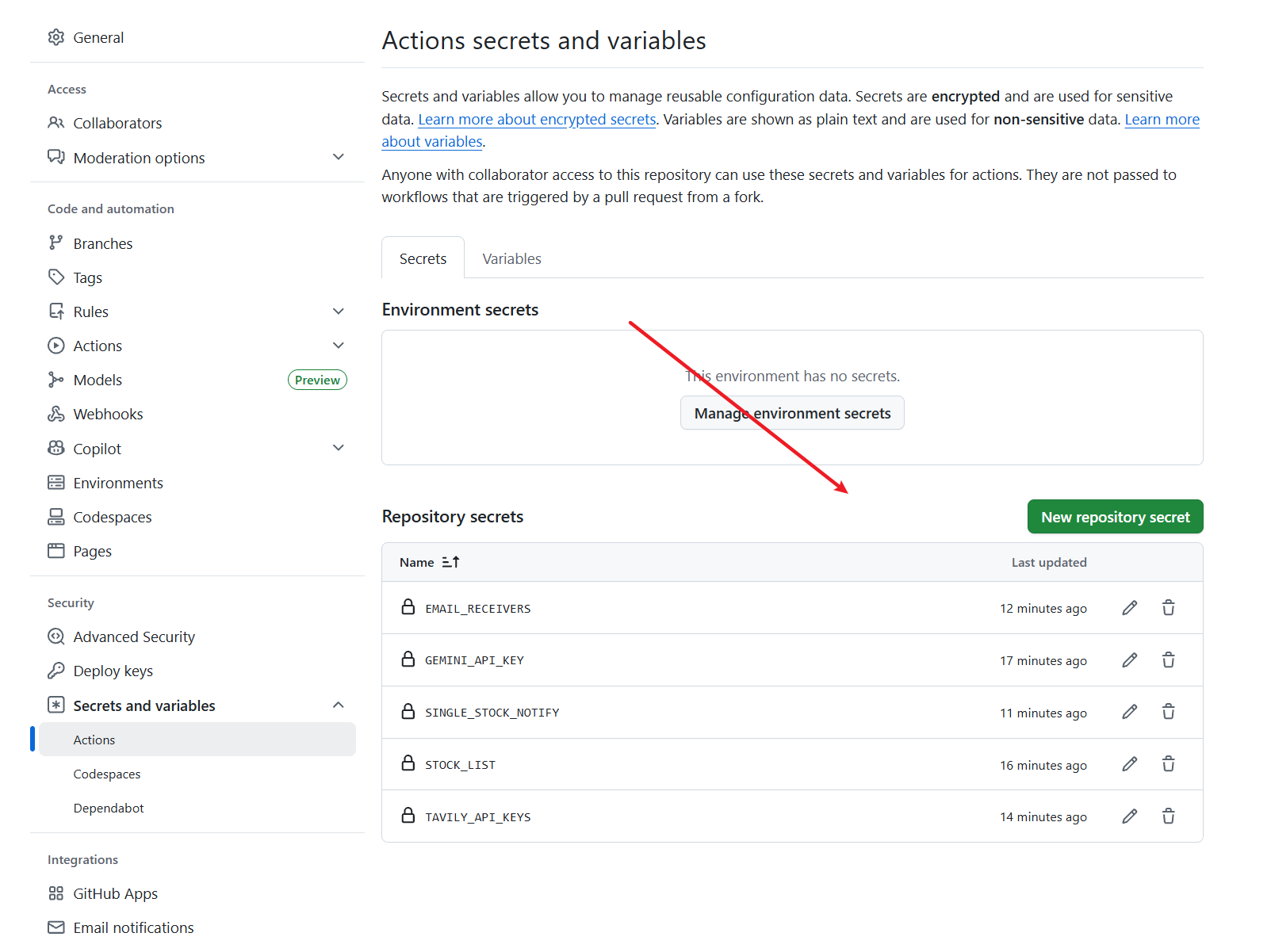
#### AI Model Configuration (Choose One)
| Secret Name | Description | Required |
|------------|------|:----:|
| `GEMINI_API_KEY` | Get free key from [Google AI Studio](https://aistudio.google.com/) | ✅* |
| `OPENAI_API_KEY` | OpenAI-compatible API Key (supports DeepSeek, Qwen, etc.) | Optional |
| `OPENAI_BASE_URL` | OpenAI-compatible API endpoint (e.g., `https://api.deepseek.com/v1`) | Optional |
| `OPENAI_MODEL` | Model name (e.g., `deepseek-chat`) | Optional |
> *Note: Configure at least one of `GEMINI_API_KEY` or `OPENAI_API_KEY`
#### Notification Channels (Multiple can be configured, all will receive notifications)
| Secret Name | Description | Required |
|------------|------|:----:|
| `WECHAT_WEBHOOK_URL` | WeChat Work Webhook URL | Optional |
| `FEISHU_WEBHOOK_URL` | Feishu Webhook URL | Optional |
| `TELEGRAM_BOT_TOKEN` | Telegram Bot Token (get from @BotFather) | Optional |
| `TELEGRAM_CHAT_ID` | Telegram Chat ID | Optional |
| `TELEGRAM_MESSAGE_THREAD_ID` | Telegram Topic ID (for sending to topics) | Optional |
| `DISCORD_WEBHOOK_URL` | Discord Webhook URL ([How to create](https://support.discord.com/hc/en-us/articles/228383668)) | Optional |
| `DISCORD_BOT_TOKEN` | Discord Bot Token (choose one with Webhook) | Optional |
| `DISCORD_CHANNEL_ID` | Discord Channel ID (required when using Bot) | Optional |
| `EMAIL_SENDER` | Sender email (e.g., `xxx@qq.com`) | Optional |
| `EMAIL_PASSWORD` | Email authorization code (not login password) | Optional |
| `EMAIL_RECEIVERS` | Receiver emails (comma-separated, leave empty to send to self) | Optional |
| `PUSHPLUS_TOKEN` | PushPlus Token ([Get here](https://www.pushplus.plus), Chinese push service) | Optional |
| `SERVERCHAN3_SENDKEY` | ServerChan v3 Sendkey ([Get here](https://sc3.ft07.com/), mobile app push service) | Optional |
| `CUSTOM_WEBHOOK_URLS` | Custom Webhook (supports DingTalk, etc., comma-separated) | Optional |
| `CUSTOM_WEBHOOK_BEARER_TOKEN` | Bearer Token for custom webhooks (for authenticated webhooks) | Optional |
> *Note: Configure at least one channel; multiple channels will all receive notifications
#### Push Behavior Configuration
| Secret Name | Description | Required |
|------------|------|:----:|
| `SINGLE_STOCK_NOTIFY` | Single stock push mode: set to `true` to push immediately after each stock analysis | Optional |
| `REPORT_TYPE` | Report type: `simple` (brief) or `full` (complete), Docker environment recommended: `full` | Optional |
| `ANALYSIS_DELAY` | Delay between stock analysis and market review (seconds) to avoid API rate limits, e.g., `10` | Optional |
#### Other Configuration
| Secret Name | Description | Required |
|------------|------|:----:|
| `STOCK_LIST` | Watchlist codes, e.g., `600519,300750,002594` | ✅ |
| `TAVILY_API_KEYS` | [Tavily](https://tavily.com/) Search API (for news search) | Recommended |
| `BOCHA_API_KEYS` | [Bocha Search](https://open.bocha.cn/) Web Search API (Chinese search optimized, supports AI summaries, multiple keys comma-separated) | Optional |
| `SERPAPI_API_KEYS` | [SerpAPI](https://serpapi.com/baidu-search-api?utm_source=github_daily_stock_analysis) Backup search | Optional |
| `TUSHARE_TOKEN` | [Tushare Pro](https://tushare.pro/weborder/#/login?reg=834638) Token | Optional |
#### ✅ Minimum Configuration Example
To get started quickly, you need at minimum:
1. **AI Model**: `GEMINI_API_KEY` (recommended) or `OPENAI_API_KEY`
2. **Notification Channel**: At least one, e.g., `WECHAT_WEBHOOK_URL` or `EMAIL_SENDER` + `EMAIL_PASSWORD`
3. **Stock List**: `STOCK_LIST` (required)
4. **Search API**: `TAVILY_API_KEYS` (strongly recommended for news search)
> Configure these 4 items and you're ready to go!
### 3. Enable Actions
1. Go to your forked repository
2. Click the `Actions` tab at the top
3. If prompted, click `I understand my workflows, go ahead and enable them`
### 4. Manual Test
1. Go to `Actions` tab
2. Select `Daily Stock Analysis` workflow on the left
3. Click `Run workflow` button on the right
4. Select run mode
5. Click green `Run workflow` to confirm
### 5. Done!
Default schedule: Every weekday at **18:00 (Beijing Time)** automatic execution.
---
## Complete Environment Variables List
### AI Model Configuration
| Variable | Description | Default | Required |
|--------|------|--------|:----:|
| `GEMINI_API_KEY` | Google Gemini API Key | - | ✅* |
| `GEMINI_MODEL` | Primary model name | `gemini-3-flash-preview` | No |
| `GEMINI_MODEL_FALLBACK` | Fallback model | `gemini-2.5-flash` | No |
| `OPENAI_API_KEY` | OpenAI-compatible API Key | - | Optional |
| `OPENAI_BASE_URL` | OpenAI-compatible API endpoint | - | Optional |
| `OPENAI_MODEL` | OpenAI model name | `gpt-4o` | Optional |
> *Note: Configure at least one of `GEMINI_API_KEY` or `OPENAI_API_KEY`
### Notification Channel Configuration
| Variable | Description | Required |
|--------|------|:----:|
| `WECHAT_WEBHOOK_URL` | WeChat Work Bot Webhook URL | Optional |
| `FEISHU_WEBHOOK_URL` | Feishu Bot Webhook URL | Optional |
| `TELEGRAM_BOT_TOKEN` | Telegram Bot Token | Optional |
| `TELEGRAM_CHAT_ID` | Telegram Chat ID | Optional |
| `TELEGRAM_MESSAGE_THREAD_ID` | Telegram Topic ID | Optional |
| `DISCORD_WEBHOOK_URL` | Discord Webhook URL | Optional |
| `DISCORD_BOT_TOKEN` | Discord Bot Token (choose one with Webhook) | Optional |
| `DISCORD_CHANNEL_ID` | Discord Channel ID (required when using Bot) | Optional |
| `EMAIL_SENDER` | Sender email | Optional |
| `EMAIL_PASSWORD` | Email authorization code (not login password) | Optional |
| `EMAIL_RECEIVERS` | Receiver emails (comma-separated, leave empty to send to self) | Optional |
| `CUSTOM_WEBHOOK_URLS` | Custom Webhook (comma-separated) | Optional |
| `CUSTOM_WEBHOOK_BEARER_TOKEN` | Custom Webhook Bearer Token | Optional |
| `PUSHOVER_USER_KEY` | Pushover User Key | Optional |
| `PUSHOVER_API_TOKEN` | Pushover API Token | Optional |
| `PUSHPLUS_TOKEN` | PushPlus Token (Chinese push service) | Optional |
| `SERVERCHAN3_SENDKEY` | ServerChan v3 Sendkey | Optional |
#### Feishu Cloud Document Configuration (Optional, solves message truncation issues)
| Variable | Description | Required |
|--------|------|:----:|
| `FEISHU_APP_ID` | Feishu App ID | Optional |
| `FEISHU_APP_SECRET` | Feishu App Secret | Optional |
| `FEISHU_FOLDER_TOKEN` | Feishu Cloud Drive Folder Token | Optional |
> Feishu Cloud Document setup steps:
> 1. Create an app in [Feishu Developer Console](https://open.feishu.cn/app)
> 2. Configure GitHub Secrets
> 3. Create a group and add the app bot
> 4. Add the group as a collaborator to the cloud drive folder (with manage permissions)
### Search Service Configuration
| Variable | Description | Required |
|--------|------|:----:|
| `TAVILY_API_KEYS` | Tavily Search API Key (recommended) | Recommended |
| `BOCHA_API_KEYS` | Bocha Search API Key (Chinese optimized) | Optional |
| `SERPAPI_API_KEYS` | SerpAPI Backup search | Optional |
### Data Source Configuration
| Variable | Description | Required |
|--------|------|:----:|
| `TUSHARE_TOKEN` | Tushare Pro Token | Optional |
### Other Configuration
| Variable | Description | Default |
|--------|------|--------|
| `STOCK_LIST` | Watchlist codes (comma-separated) | - |
| `MAX_WORKERS` | Concurrent threads | `3` |
| `MARKET_REVIEW_ENABLED` | Enable market review | `true` |
| `SCHEDULE_ENABLED` | Enable scheduled tasks | `false` |
| `SCHEDULE_TIME` | Scheduled execution time | `18:00` |
| `LOG_DIR` | Log directory | `./logs` |
---
## Docker Deployment
### Quick Start
```bash
# 1. Clone repository
git clone https://github.com/ZhuLinsen/daily_stock_analysis.git
cd daily_stock_analysis
# 2. Configure environment variables
cp .env.example .env
vim .env # Fill in API Keys and configuration
# 3. Start container
docker-compose -f ./docker/docker-compose.yml up -d server # Web service mode (recommended, provides API & WebUI)
docker-compose -f ./docker/docker-compose.yml up -d analyzer # Scheduled task mode
docker-compose -f ./docker/docker-compose.yml up -d # Start both modes
# 4. Access WebUI
# http://localhost:8000
# 5. View logs
docker-compose -f ./docker/docker-compose.yml logs -f server
```
### Run Mode Description
| Command | Description | Port |
|------|------|------|
| `docker-compose -f ./docker/docker-compose.yml up -d server` | Web service mode, provides API & WebUI | 8000 |
| `docker-compose -f ./docker/docker-compose.yml up -d analyzer` | Scheduled task mode, daily auto execution | - |
| `docker-compose -f ./docker/docker-compose.yml up -d` | Start both modes simultaneously | 8000 |
### Docker Compose Configuration
`docker-compose.yml` uses YAML anchors to reuse configuration:
```yaml
version: '3.8'
x-common: &common
build: .
restart: unless-stopped
env_file:
- .env
environment:
- TZ=Asia/Shanghai
volumes:
- ./data:/app/data
- ./logs:/app/logs
- ./reports:/app/reports
- ./.env:/app/.env
services:
# Scheduled task mode
analyzer:
<<: *common
container_name: stock-analyzer
# FastAPI mode
server:
<<: *common
container_name: stock-server
command: ["python", "main.py", "--serve-only", "--host", "0.0.0.0", "--port", "8000"]
ports:
- "8000:8000"
```
### Common Commands
```bash
# View running status
docker-compose -f ./docker/docker-compose.yml ps
# View logs
docker-compose -f ./docker/docker-compose.yml logs -f server
# Stop services
docker-compose -f ./docker/docker-compose.yml down
# Rebuild image (after code update)
docker-compose -f ./docker/docker-compose.yml build --no-cache
docker-compose -f ./docker/docker-compose.yml up -d server
```
### Manual Image Build
```bash
docker build -t stock-analysis .
docker run -d --env-file .env -p 8000:8000 -v ./data:/app/data stock-analysis python main.py --serve-only --host 0.0.0.0 --port 8000
```
---
## Local Deployment
### Install Dependencies
```bash
# Python 3.10+ recommended
pip install -r requirements.txt
# Or use conda
conda create -n stock python=3.10
conda activate stock
pip install -r requirements.txt
```
### Command Line Arguments
```bash
python main.py # Full analysis (stocks + market review)
python main.py --market-review # Market review only
python main.py --no-market-review # Stock analysis only
python main.py --stocks 600519,300750 # Specify stocks
python main.py --dry-run # Fetch data only, no AI analysis
python main.py --no-notify # Don't send notifications
python main.py --schedule # Scheduled task mode
python main.py --debug # Debug mode (verbose logging)
python main.py --workers 5 # Specify concurrency
```
---
## Scheduled Task Configuration
### GitHub Actions Schedule
Edit `.github/workflows/daily_analysis.yml`:
```yaml
schedule:
# UTC time, Beijing time = UTC + 8
- cron: '0 10 * * 1-5' # Monday to Friday 18:00 (Beijing Time)
```
Common time reference:
| Beijing Time | UTC cron expression |
|---------|----------------|
| 09:30 | `'30 1 * * 1-5'` |
| 12:00 | `'0 4 * * 1-5'` |
| 15:00 | `'0 7 * * 1-5'` |
| 18:00 | `'0 10 * * 1-5'` |
| 21:00 | `'0 13 * * 1-5'` |
### Local Scheduled Tasks
```bash
# Start scheduled mode (default 18:00 execution)
python main.py --schedule
# Or use crontab
crontab -e
# Add: 0 18 * * 1-5 cd /path/to/project && python main.py
```
---
## Notification Channel Configuration
### WeChat Work
1. Add "Group Bot" in WeChat Work group chat
2. Copy Webhook URL
3. Set `WECHAT_WEBHOOK_URL`
### Feishu
1. Add "Custom Bot" in Feishu group chat
2. Copy Webhook URL
3. Set `FEISHU_WEBHOOK_URL`
### Telegram
1. Talk to @BotFather to create a Bot
2. Get Bot Token
3. Get Chat ID (via @userinfobot)
4. Set `TELEGRAM_BOT_TOKEN` and `TELEGRAM_CHAT_ID`
5. (Optional) To send to Topic, set `TELEGRAM_MESSAGE_THREAD_ID` (get from Topic link)
### Email
1. Enable SMTP service for your email
2. Get authorization code (not login password)
3. Set `EMAIL_SENDER`, `EMAIL_PASSWORD`, `EMAIL_RECEIVERS`
Supported email providers:
- QQ Mail: smtp.qq.com:465
- 163 Mail: smtp.163.com:465
- Gmail: smtp.gmail.com:587
### Custom Webhook
Supports any POST JSON Webhook, including:
- DingTalk Bot
- Discord Webhook
- Slack Webhook
- Bark (iOS push)
- Self-hosted services
Set `CUSTOM_WEBHOOK_URLS`, separate multiple with commas.
### Discord
Discord supports two push methods:
**Method 1: Webhook (Recommended, Simple)**
1. Create Webhook in Discord channel settings
2. Copy Webhook URL
3. Configure environment variable:
```bash
DISCORD_WEBHOOK_URL=https://discord.com/api/webhooks/xxx/yyy
```
**Method 2: Bot API (Requires more permissions)**
1. Create application in [Discord Developer Portal](https://discord.com/developers/applications)
2. Create Bot and get Token
3. Invite Bot to server
4. Get Channel ID (right-click channel in developer mode)
5. Configure environment variables:
```bash
DISCORD_BOT_TOKEN=your_bot_token
DISCORD_CHANNEL_ID=your_channel_id
```
### Pushover (iOS/Android Push)
[Pushover](https://pushover.net/) is a cross-platform push service supporting iOS and Android.
1. Register Pushover account and download App
2. Get User Key from [Pushover Dashboard](https://pushover.net/)
3. Create Application to get API Token
4. Configure environment variables:
```bash
PUSHOVER_USER_KEY=your_user_key
PUSHOVER_API_TOKEN=your_api_token
```
Features:
- Supports iOS/Android
- Supports notification priority and sound settings
- Free quota sufficient for personal use (10,000 messages/month)
- Messages retained for 7 days
---
## Data Source Configuration
System defaults to AkShare (free), also supports other data sources:
### AkShare (Default)
- Free, no configuration needed
- Data source: Eastmoney scraper
### Tushare Pro
- Requires registration to get Token
- More stable, more comprehensive data
- Set `TUSHARE_TOKEN`
### Baostock
- Free, no configuration needed
- Used as backup data source
### YFinance
- Free, no configuration needed
- Supports US/HK stock data
---
## Advanced Features
### Hong Kong Stock Support
Use `hk` prefix for HK stock codes:
```bash
STOCK_LIST=600519,hk00700,hk01810
```
### Multi-Model Switching
Configure multiple models, system auto-switches:
```bash
# Gemini (primary)
GEMINI_API_KEY=xxx
GEMINI_MODEL=gemini-3-flash-preview
# OpenAI compatible (backup)
OPENAI_API_KEY=xxx
OPENAI_BASE_URL=https://api.deepseek.com/v1
OPENAI_MODEL=deepseek-chat
```
### Debug Mode
```bash
python main.py --debug
```
Log file locations:
- Regular logs: `logs/stock_analysis_YYYYMMDD.log`
- Debug logs: `logs/stock_analysis_debug_YYYYMMDD.log`
---
## Backtesting
The backtesting module automatically validates historical AI analysis records against actual price movements, evaluating the accuracy of analysis recommendations.
### How It Works
1. Selects `AnalysisHistory` records past the cooldown period (default 14 days)
2. Fetches daily bar data after the analysis date (forward bars)
3. Infers expected direction from the operation advice and compares against actual movement
4. Evaluates stop-loss/take-profit hit conditions and simulates execution returns
5. Aggregates into overall and per-stock performance metrics
### Operation Advice Mapping
| Operation Advice | Position | Expected Direction | Win Condition |
|-----------------|----------|-------------------|---------------|
| Buy / Add / Strong Buy | long | up | Return >= neutral band |
| Sell / Reduce / Strong Sell | cash | down | Decline >= neutral band |
| Hold | long | not_down | No significant decline |
| Wait / Observe | cash | flat | Price within neutral band |
### Configuration
Set the following variables in `.env` (all optional, have defaults):
| Variable | Default | Description |
|----------|---------|-------------|
| `BACKTEST_ENABLED` | `true` | Whether to auto-run backtest after daily analysis |
| `BACKTEST_EVAL_WINDOW_DAYS` | `10` | Evaluation window (trading days) |
| `BACKTEST_MIN_AGE_DAYS` | `14` | Only backtest records older than N days to avoid incomplete data |
| `BACKTEST_ENGINE_VERSION` | `v1` | Engine version, used to distinguish results when logic is updated |
| `BACKTEST_NEUTRAL_BAND_PCT` | `2.0` | Neutral band threshold (%), ±2% treated as range-bound |
### Auto-run
Backtesting triggers automatically after the daily analysis flow completes (non-blocking; failures do not affect notifications). It can also be triggered manually via API.
### Evaluation Metrics
| Metric | Description |
|--------|-------------|
| `direction_accuracy_pct` | Direction prediction accuracy (expected direction matches actual) |
| `win_rate_pct` | Win rate (wins / (wins + losses), excludes neutral) |
| `avg_stock_return_pct` | Average stock return percentage |
| `avg_simulated_return_pct` | Average simulated execution return (including SL/TP exits) |
| `stop_loss_trigger_rate` | Stop-loss trigger rate (only counts records with SL configured) |
| `take_profit_trigger_rate` | Take-profit trigger rate (only counts records with TP configured) |
---
## FastAPI API Service
FastAPI provides RESTful API service for configuration management and triggering analysis.
### Startup Methods
| Command | Description |
|------|------|
| `python main.py --serve` | Start API service + run full analysis once |
| `python main.py --serve-only` | Start API service only, manually trigger analysis |
### Features
- **Configuration Management** - View/modify watchlist
- **Quick Analysis** - Trigger analysis via API
- **Real-time Progress** - Analysis task status updates in real-time, supports parallel tasks
- **Backtest Validation** - Evaluate historical analysis accuracy, query direction win rate and simulated returns
- **API Documentation** - Visit `/docs` for Swagger UI
### API Endpoints
| Endpoint | Method | Description |
|------|------|------|
| `/api/v1/analysis/analyze` | POST | Trigger stock analysis |
| `/api/v1/analysis/tasks` | GET | Query task list |
| `/api/v1/analysis/status/{task_id}` | GET | Query task status |
| `/api/v1/history` | GET | Query analysis history |
| `/api/v1/backtest/run` | POST | Trigger backtest |
| `/api/v1/backtest/results` | GET | Query backtest results (paginated) |
| `/api/v1/backtest/performance` | GET | Get overall backtest performance |
| `/api/v1/backtest/performance/{code}` | GET | Get per-stock backtest performance |
| `/api/health` | GET | Health check |
| `/docs` | GET | API Swagger documentation |
**Usage examples**:
```bash
# Health check
curl http://127.0.0.1:8000/api/health
# Trigger analysis (A-shares)
curl -X POST http://127.0.0.1:8000/api/v1/analysis/analyze \
-H 'Content-Type: application/json' \
-d '{"stock_code": "600519"}'
# Query task status
curl http://127.0.0.1:8000/api/v1/analysis/status/
# Trigger backtest (all stocks)
curl -X POST http://127.0.0.1:8000/api/v1/backtest/run \
-H 'Content-Type: application/json' \
-d '{"force": false}'
# Trigger backtest (specific stock)
curl -X POST http://127.0.0.1:8000/api/v1/backtest/run \
-H 'Content-Type: application/json' \
-d '{"code": "600519", "force": false}'
# Query overall backtest performance
curl http://127.0.0.1:8000/api/v1/backtest/performance
# Query per-stock backtest performance
curl http://127.0.0.1:8000/api/v1/backtest/performance/600519
# Paginated backtest results
curl "http://127.0.0.1:8000/api/v1/backtest/results?page=1&limit=20"
```
### Custom Configuration
Modify default port or allow LAN access:
```bash
python main.py --serve-only --host 0.0.0.0 --port 8888
```
### Supported Stock Code Formats
| Type | Format | Examples |
|------|------|------|
| A-shares | 6-digit number | `600519`, `000001`, `300750` |
| HK stocks | hk + 5-digit number | `hk00700`, `hk09988` |
### Notes
- Browser access: `http://127.0.0.1:8000` (or your configured port)
- After analysis completion, notifications are automatically pushed to configured channels
- This feature is automatically disabled in GitHub Actions environment
---
## FAQ
### Q: Push messages getting truncated?
A: WeChat Work/Feishu have message length limits, system already auto-segments messages. For complete content, configure Feishu Cloud Document feature.
### Q: Data fetch failed?
A: AkShare uses scraping mechanism, may be temporarily rate-limited. System has retry mechanism configured, usually just wait a few minutes and retry.
### Q: How to add watchlist stocks?
A: Modify `STOCK_LIST` environment variable, separate multiple codes with commas.
### Q: GitHub Actions not executing?
A: Check if Actions is enabled, and if cron expression is correct (note it's UTC time).
---
For more questions, please [submit an Issue](https://github.com/ZhuLinsen/daily_stock_analysis/issues)